

The 6club register process takes a couple of minutes if you have a mobile number that can receive SMS and a few minutes of patience for the OTP. This walkthrough covers the five steps in order, the details that matter later at withdrawal, and the fixes for the two problems that stop most new accounts. Always begin from the official 6club homepage so that you are filling in the genuine form and not a copy.
Key Takeaways
- You need an Indian mobile number that receives SMS, and you must be 18 or over.
- Register with the exact name on the bank or UPI account you will withdraw to.
- The password should be long, unique and never shared, including with support.
- One 6club account per person; recover a forgotten account instead of making a new one.
- Depositing is optional and separate; you can finish sign-up without adding funds.
Before You Start: What to Have Ready
A little preparation makes registration smoother and prevents the most common withdrawal problem later on. Gather the items below before you open the form.
- A mobile number in your own name that can receive SMS right now.
- The exact name printed on the bank account or UPI ID you plan to use.
- A new password idea you have not used on any other site.
- An invitation code, if a friend gave you one; it is usually optional.
- Confirmation that you are aged 18 or over and allowed to use the service where you live.
Step 1: Open the Official 6club Register Page
Reach the registration form from the genuine site only. The 6 Club Register page explains the form field by field, and the homepage links to it directly. Check the address bar spelling before you type anything. If you arrived from a chat message or a search ad, close it and start again from a bookmark or a typed address.
Step 2: Enter Your Mobile Number
Type the number with the correct country code and without spaces. This number becomes your login identifier, so it must be one you control and expect to keep. If the form says the number is already registered, do not create a second account; an earlier account exists and can be recovered from the login page.
- Use your own number, not a family member's, because recovery depends on it.
- Double-check each digit; a typo sends the OTP to a stranger.
- Make sure the phone has signal and is not in a do-not-disturb mode that hides SMS.
Step 3: Verify Your 6club OTP
Tap the button to send the one-time code and enter it in the field shown. The code is only ever typed into the registration or login form. No agent, chat bot or support person ever needs it. If it does not arrive, wait a short while before requesting another; multiple rapid requests can delay delivery further. The troubleshooting section below covers stubborn cases.
Step 4: Set Your Password and Profile Details
Choose a password that you do not use anywhere else. Length beats complexity: a long phrase with a number and a symbol is easier to remember and harder to guess than a short jumble. Then fill in the profile fields, paying most attention to the name.
| Field | Good practice | Why it matters |
|---|---|---|
| Password | Long, unique, mixes letters, numbers and a symbol | Reused passwords are the top cause of account takeovers |
| Name | Exactly as on your bank or UPI account | Withdrawal checks compare the two names |
| Invitation code | Enter if you have one, otherwise leave blank if allowed | Links the referral only; does not change the games |
| Extra contact | Add an email if offered | Gives support a second way to reach you |
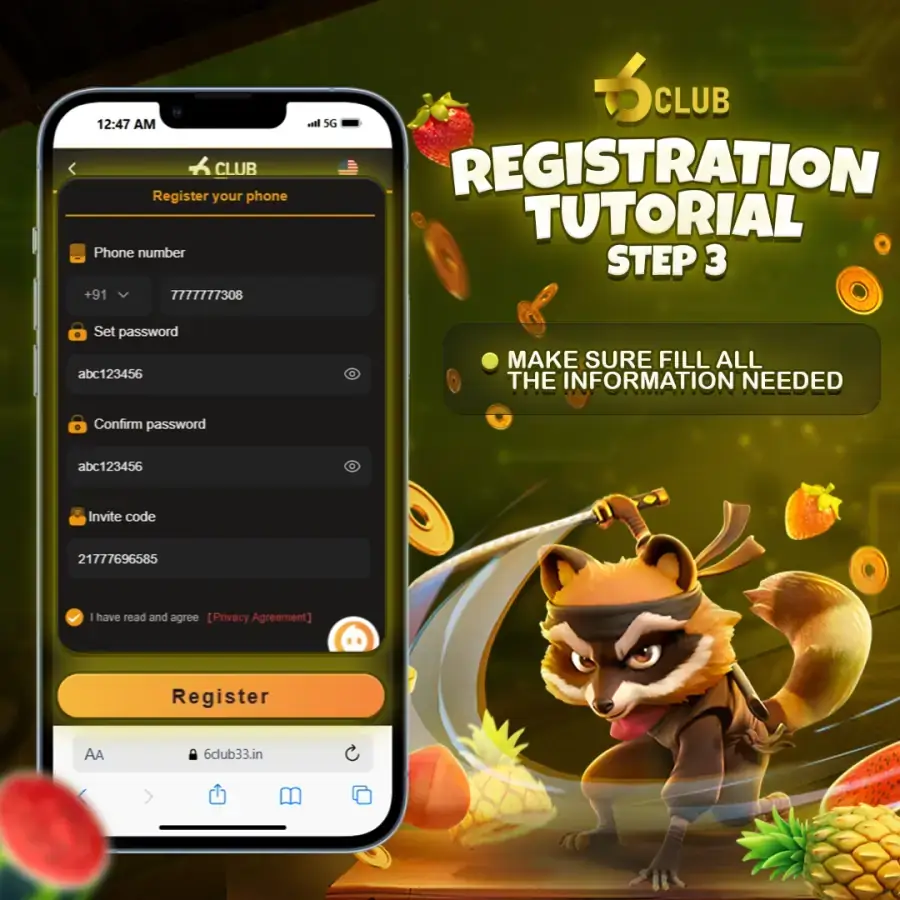
Step 5: Complete Your First Login
Submit the form and your 6club account is live. You are taken to the lobby, or asked to sign in with the number and password you just set. Use this first session to look around rather than to deposit. Open the wallet screen, read the rules of one game, find the support route, and confirm your profile details saved correctly.
- Sign in and check that your name and number appear correctly in the profile.
- Find the logout option so you know where it is on shared devices.
- Read the rules screen for a game before joining a round.
- Decide a budget and a time limit before adding any funds.
Every game is chance-based and the platform is for adults aged 18 and over. The budget and time limit you set now are the two most useful habits you will carry forward; the account safety habits article expands on both.
Common 6club Register Mistakes
Most registration problems come from a handful of avoidable errors. The table below lists the ones support teams see most, with the fix for each.
| Mistake | What happens | Fix |
|---|---|---|
| Nickname instead of real name | First withdrawal is held for a name mismatch | Use the bank or UPI name from the start |
| Second account on a new number | Duplicates are usually frozen at withdrawal | Recover the original account instead |
| Reused password | A leak elsewhere exposes this account | Create a unique password now |
| Form opened from a chat link | Details may go to a copycat site | Start again from the official homepage |
OTP Not Arriving? Work Through These in Order
A late code is the most common reason a 6club register attempt stalls, and it is almost always a phone or network issue rather than an account problem. Work down the list once, in order, before contacting anyone.
- Confirm the number and country code you typed are exactly right.
- Check signal strength and switch off any SMS-blocking or spam-filter apps.
- Wait a few minutes before tapping resend; rapid repeats slow delivery.
- Restart the phone; a stuck messaging service is a frequent cause.
- Check the blocked or spam folder in your messaging app.
- Try again later if the network is congested, then contact Support with your number if it still fails.
Never accept an offer from anyone to complete verification for you. The code is yours alone, and the platform will never ask you to share it by phone or chat. Guidance on protecting one-time codes and accounts is also published by the Google Safety Center.
After Registration: Confirm You Are on the Real Site
Once your 6club account exists, the risk shifts from a wrong form to a wrong login page. Bookmark the genuine homepage now, and read the 6club official website checks so you can spot a copy in seconds. New to the platform entirely? The plain-English platform guide explains what you have just signed up to.
Frequently Asked Questions
Do I need an invitation code to complete 6club register?
On most builds the code field is optional and can be left blank. Where it is marked required, any valid code works. It does not change the games or your withdrawal terms. Confirm the current rule on the official registration page.
Can I register with an email address only?
No. The mobile number is the login identifier and OTP verification runs through SMS. Some builds accept an email as an extra contact, but you still need a working Indian mobile number.
What if my number says it is already registered?
An account already exists on that number, possibly one you created and forgot. Do not open a second account. Use the password recovery option on the login page or contact support.
Do I have to deposit during registration?
No. Registration and depositing are separate. You can finish sign-up, look around the lobby and read the rules without adding funds.